
CYBEX HR is a cloud biometric attendance system and HR management software for fingerprint and face-recognition attendance machines. It pulls punches from 60+ popular biometric machine models, then calculates shift-wise daily attendance, late arrival, early leave, overtime and total working hours automatically. Built by CYBEX IT Solutions in Faisalabad for hospitals and shift-based organisations in Pakistan, and ready for any company worldwide.
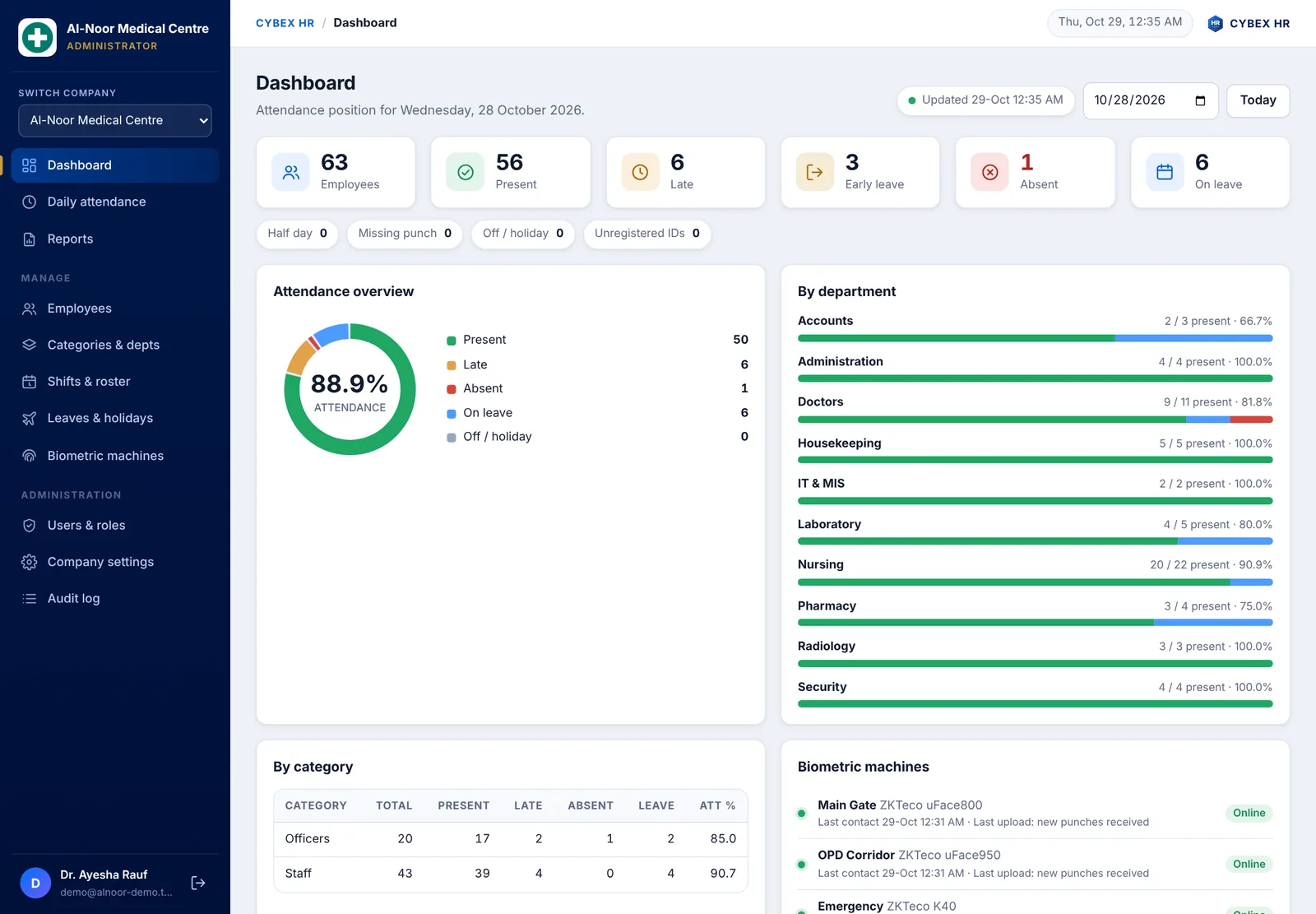
Why choose CYBEX HR attendance software?
- No more Excel sheets. Punches from your biometric machines become a finished attendance sheet and HR reports without manual work.
- Works with your existing machines. Cloud push or the CYBEX HR Connector on any office PC, with no new hardware to buy.
- Built for shifts. Morning, evening and night shifts, overnight duties, Friday timings and rotating rosters.
- Fast, modern portal. Opens instantly with the last loaded data, refreshes in the background, and works on desktop, tablet and mobile.
- Multi-company. Every company has its own private data, and one login can switch between several companies.
- Secure. HTTPS, role-based access and an audit log. Only administrators can edit attendance times.
Connect your biometric machines in minutes
Choose the method that suits your network. Both can be used together, and each machine is added by its serial number or found automatically.
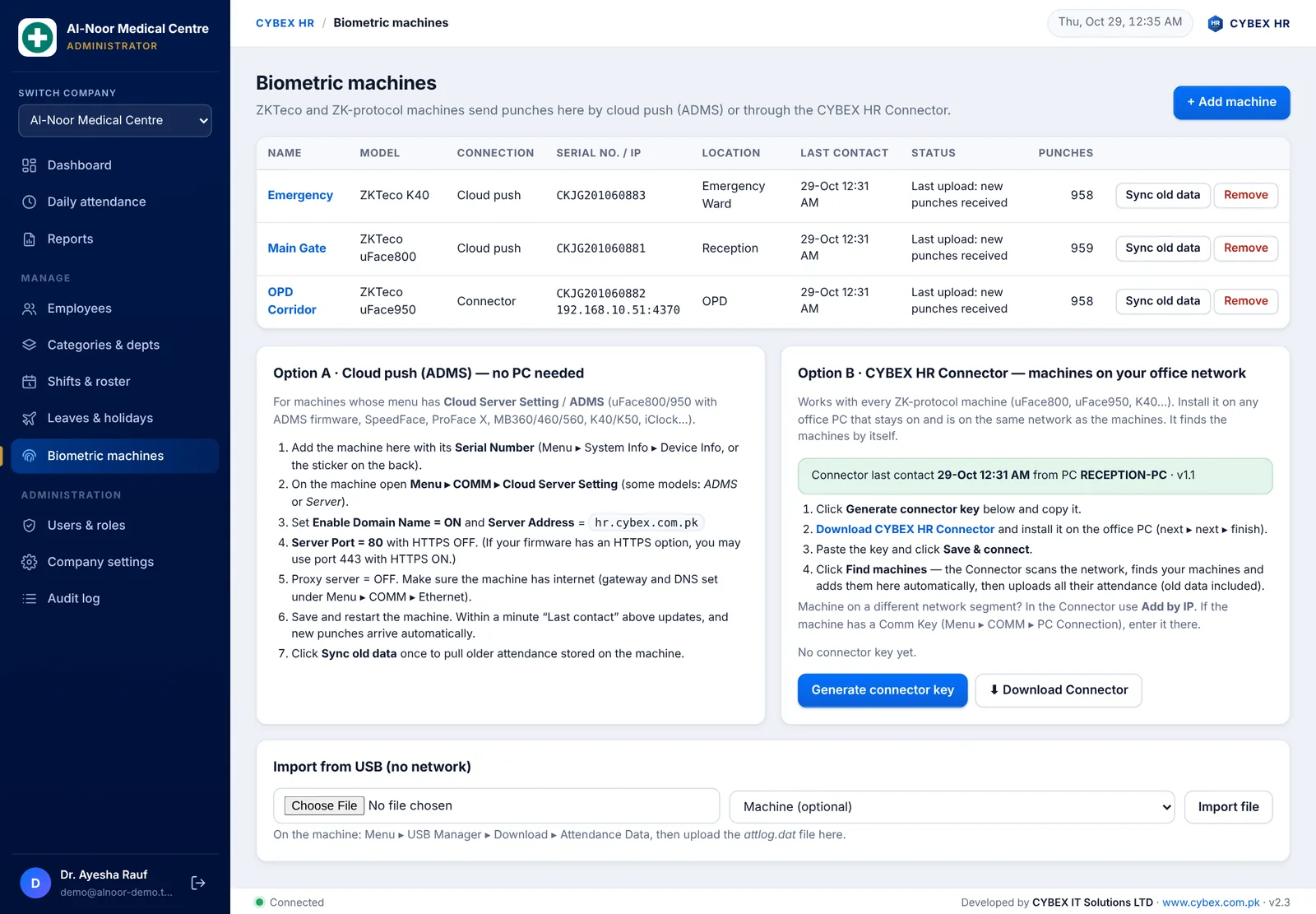
Option A: Cloud push, no PC needed
For face and fingerprint machines that offer a cloud server setting. Enter the server address on the machine and punches arrive automatically within a minute.
Option B: CYBEX HR Connector for machines on your office network
Install the free Windows Connector on any PC that stays on. It scans your network, finds every compatible machine, adds it to your account and uploads all attendance, including old data already stored on the machine. You can also click Sync old data any time, or import an attendance file from a USB drive when there is no network.
Complete feature list
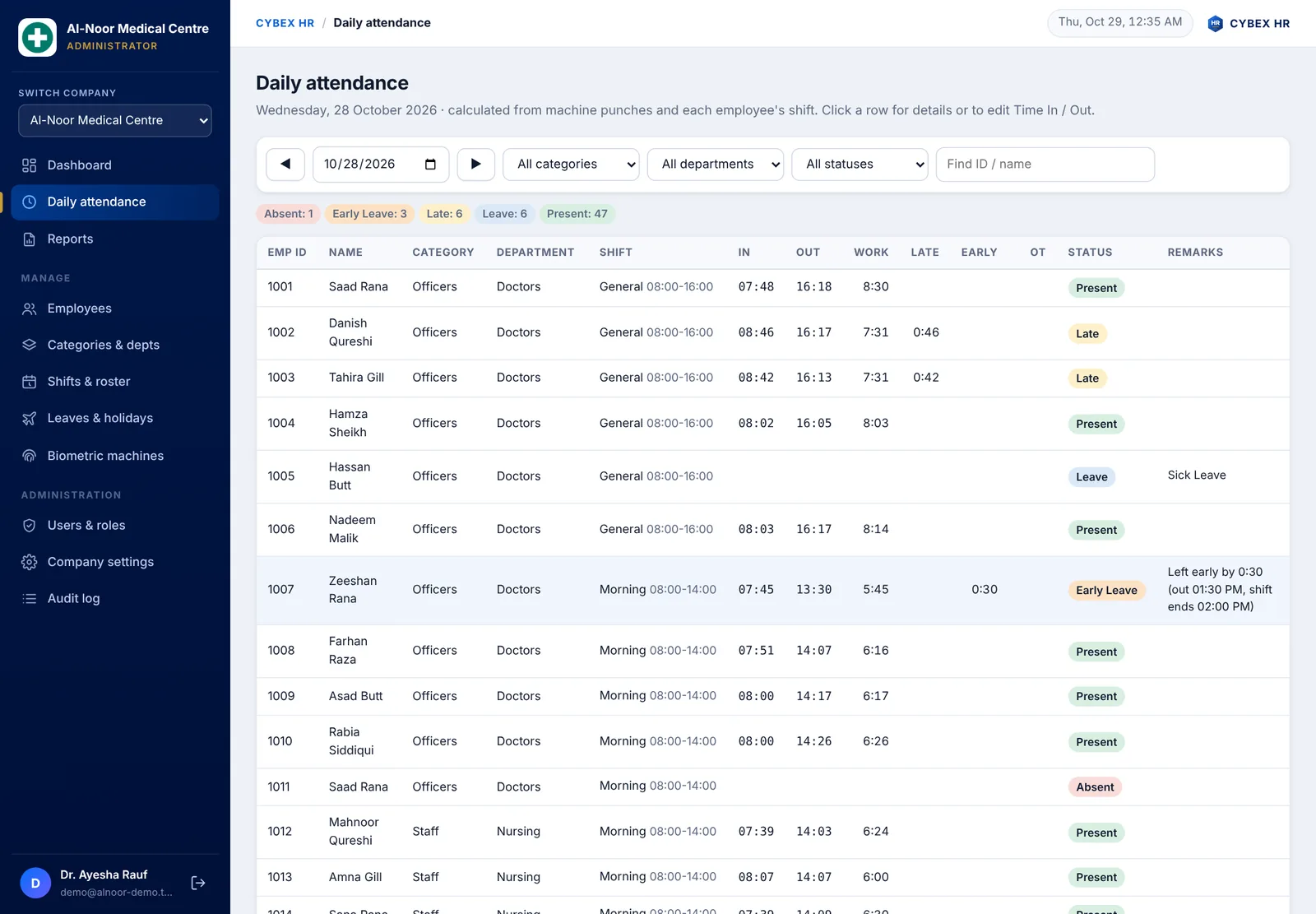
Automatic daily attendance
- Time in, time out, working hours, late, early leave, overtime and status for every employee, every day.
- Statuses such as Present, Late, Early Leave, Half Day, Missing Punch, Absent, Leave and Off or Holiday.
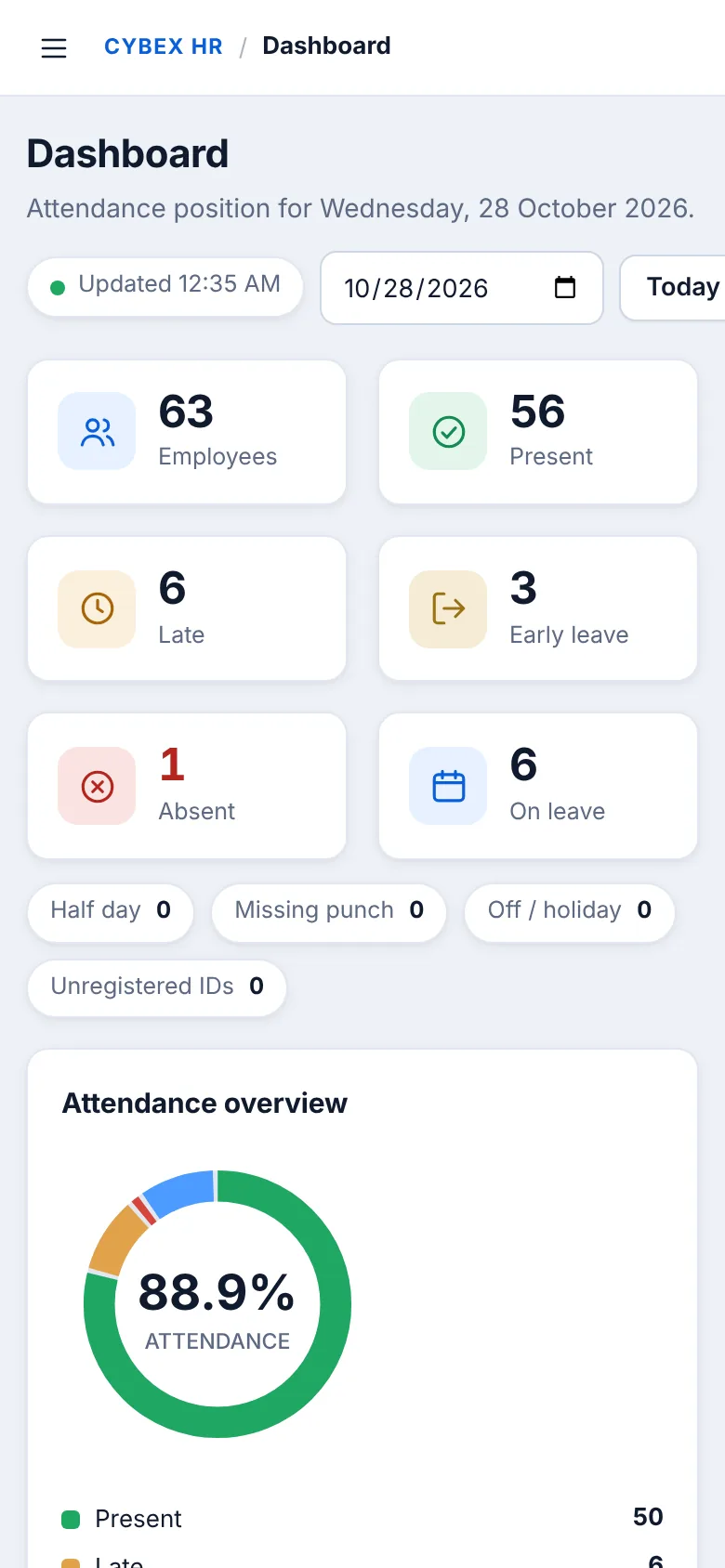
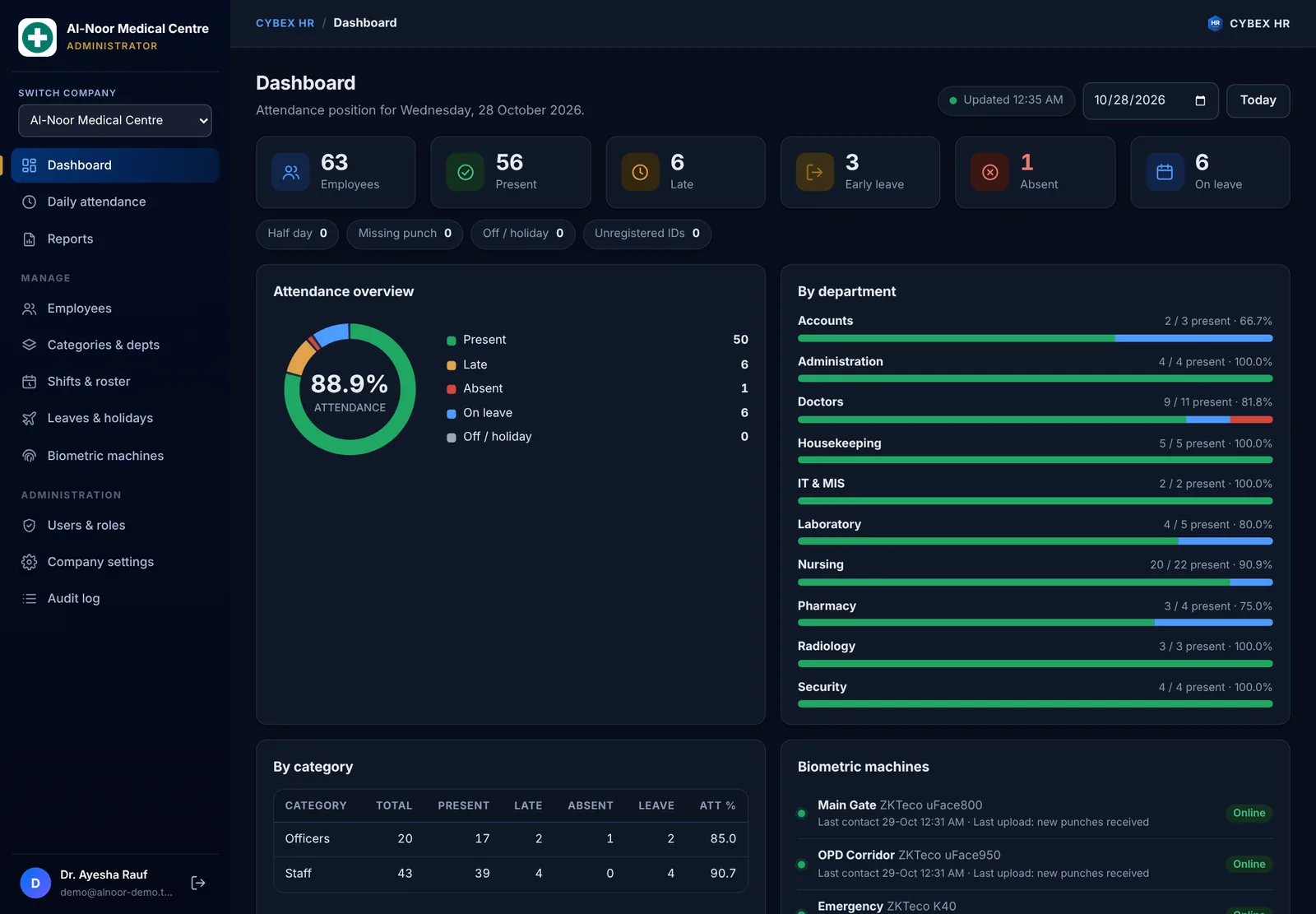
- Dashboard with present, late, absent, leave and unregistered machine IDs by department and category.
- Manual punches and Time In or Out corrections by administrators only, so records stay trustworthy.
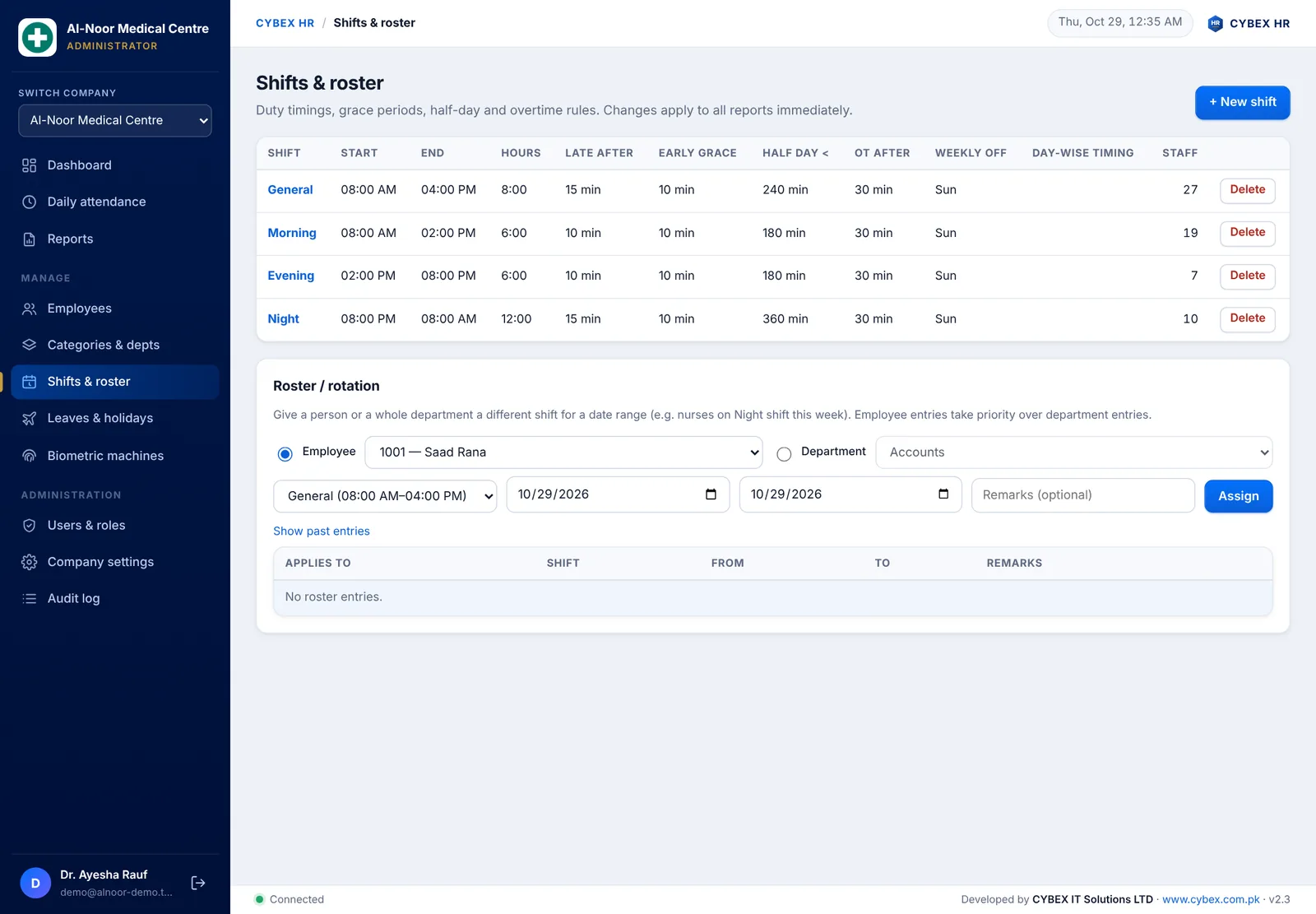
Shift management and duty roster
- Unlimited shifts, including night and overnight shifts, with grace periods, half-day rules, overtime rules and weekly offs.
- Day-wise timing, for example shorter Friday hours.
- Rotating rosters for one employee or a whole department.
- A dedicated Shift Manager role for supervisors.
Leave management and holidays
- Leave types such as casual, sick, annual, maternity and official duty, with paid or unpaid setting.
- Approved leave shows as Leave instead of Absent. Gazetted holidays show as Holiday for everyone.
- A dedicated Leave Manager role.
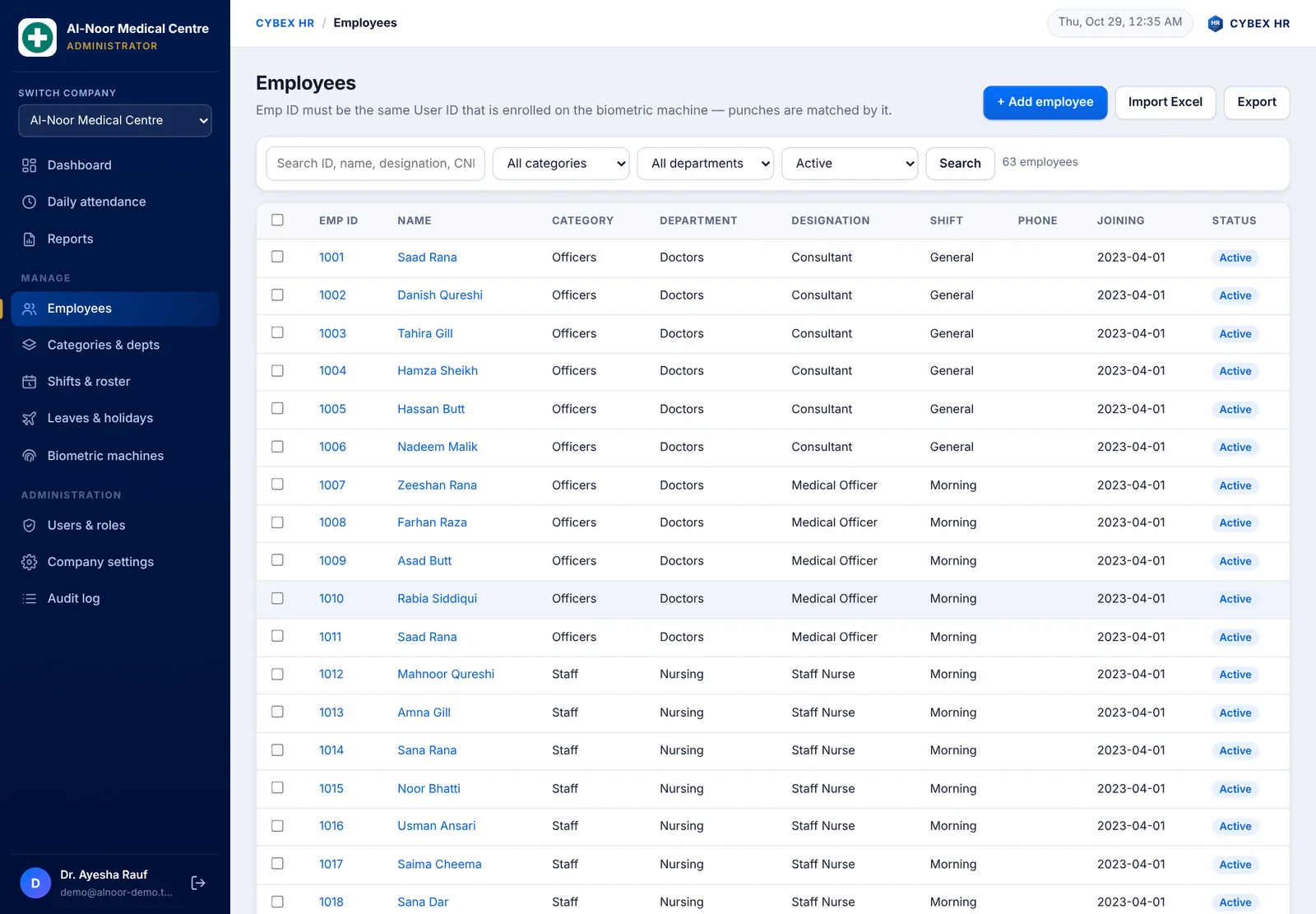
Employees, departments and categories
- Employee records with Emp ID, designation, department, category such as Officers and Staff, and shift.
- Import your employee list from Excel or CSV with the ready template.
- Departments such as Doctors, Nursing, Pharmacy, Laboratory, Administration, Accounts and IT.
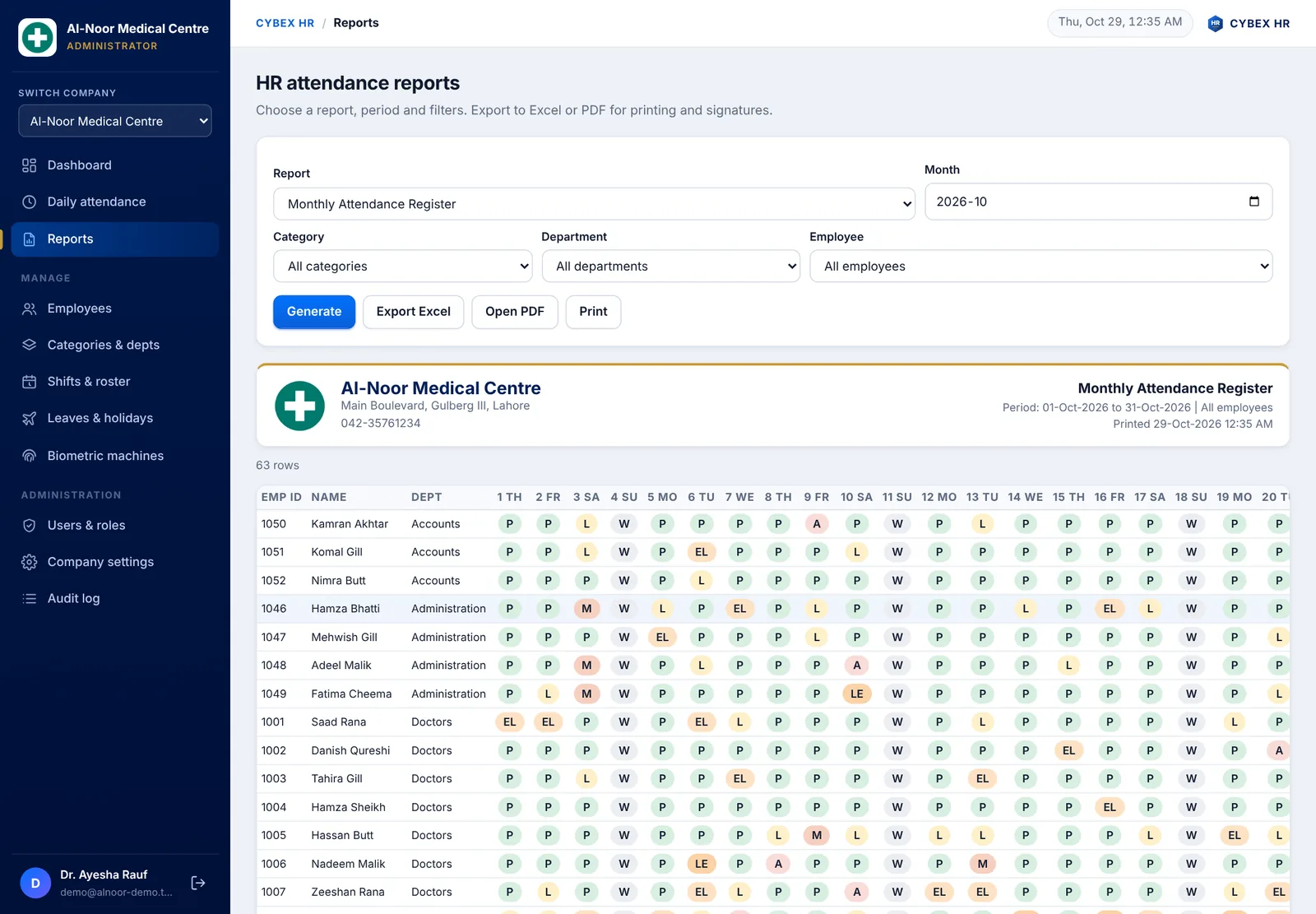
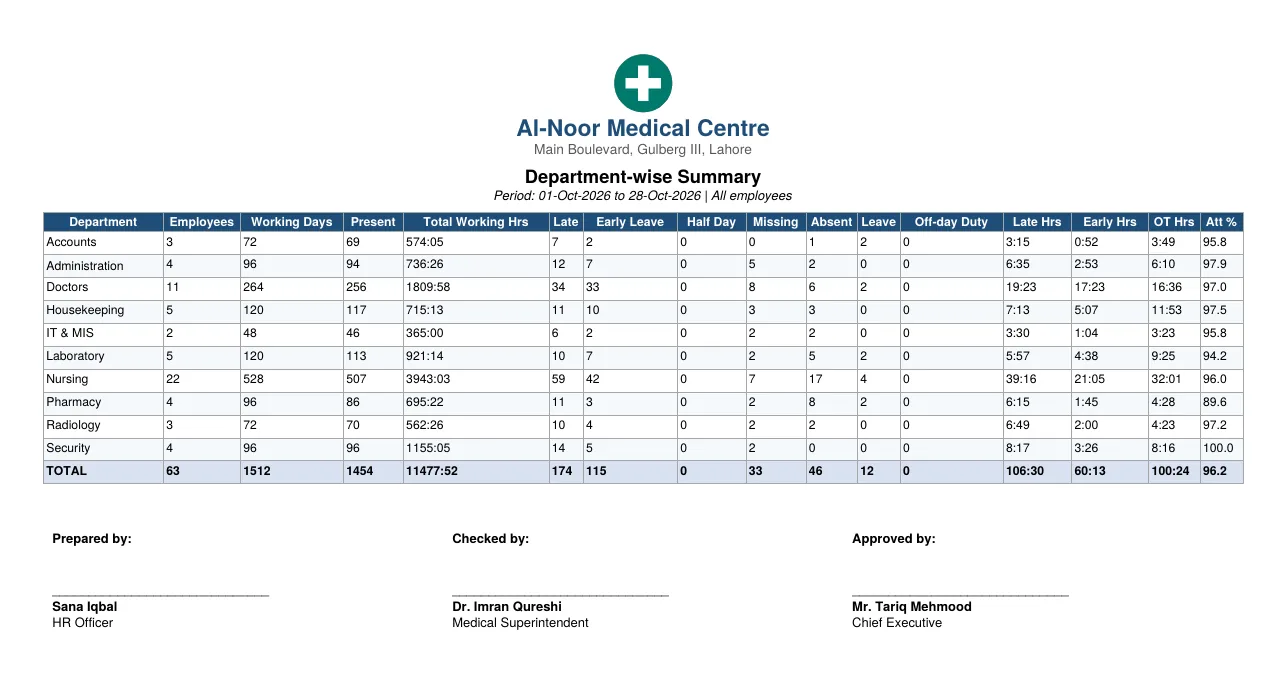
15 HR attendance reports with total working hours
- Daily Attendance, Time In / Time Out Log, Monthly Attendance Register and Employee-wise Summary.
- Employee Attendance Card, Late Arrival, Absentee, Early Departure, Overtime and Missing Punch reports.
- Department-wise and Category-wise summaries, Leave report, Raw Punch Log and Unregistered Machine IDs.
- Every report shows total working hours, carries your company logo and name, and exports to Excel and PDF with Prepared by, Checked by and Approved by signature lines.
Users, roles and security
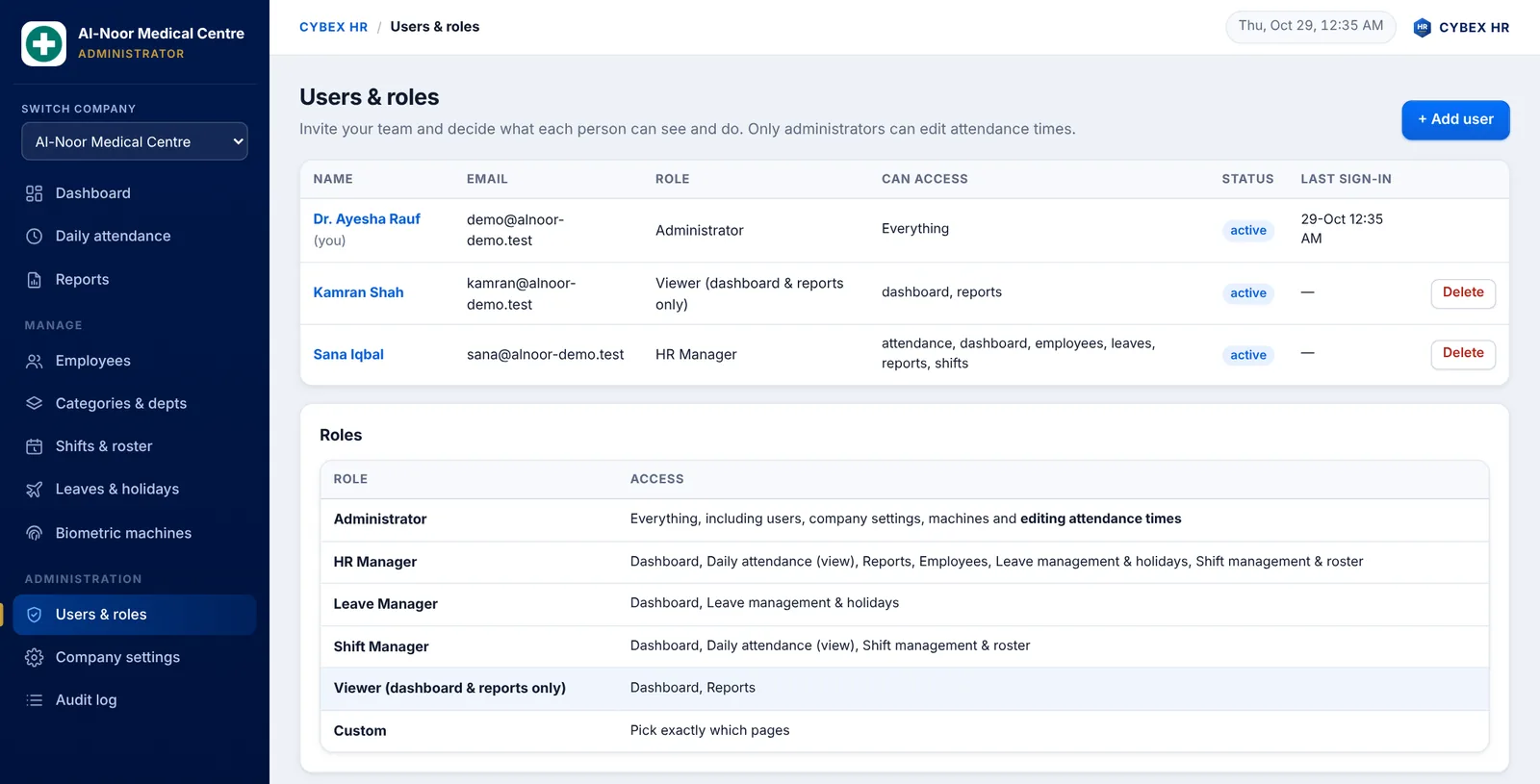
- Roles: Administrator, HR Manager, Leave Manager, Shift Manager, Viewer (dashboard and reports only) and Custom.
- Only an administrator can edit attendance times.
- Add the same person to several companies with a different role in each, and switch from the company menu.
- Audit log, secure HTTPS connection and separate private data for every company.
Who uses biometric attendance software?
CYBEX HR was designed for hospital HR teams and suits hospitals, clinics, laboratories, pharmacies, factories, schools, colleges, offices, security companies and retail chains in Lahore, Karachi, Islamabad, Faisalabad and across Pakistan, as well as international teams.
Compatible biometric machines
CYBEX HR works with 60+ fingerprint and face-recognition attendance machine models from popular brands. Choose your model when adding a device, or pick Other. Not sure about your model? Ask us on WhatsApp before you buy.
How it works
- Create your company account and add your logo, departments, categories and shifts.
- Connect your machines by cloud push or the Connector. Old attendance on the machine is uploaded too.
- Import your employees from Excel, using the same Emp IDs enrolled on the machine.
- Open the dashboard and download Excel or PDF reports for HR, payroll preparation and management.
Frequently asked questions about biometric attendance software
What is a biometric attendance system?
A biometric attendance system records employee attendance with fingerprint or face recognition instead of cards or registers. The attendance machine stores each punch, and software such as CYBEX HR turns those punches into daily attendance, late, early-leave, overtime and working-hours reports.
What is the best biometric attendance software in Pakistan?
The best choice is software that works with the machines you already own, understands shifts and produces reports your HR team can sign. CYBEX HR supports 60+ machine models, night shifts, rosters, leave management and 15 Excel and PDF reports, and is built and supported in Faisalabad, Pakistan.
Which biometric machines are compatible with CYBEX HR?
60+ fingerprint and face-recognition attendance machine models are supported, including machines that offer cloud push or can be read over the local network. Choose your model when adding a device, or select Other.
Does the software work with face recognition attendance machines?
Yes. Face-recognition and fingerprint machines can send punches directly to the portal through cloud push, or be read over the local network by the CYBEX HR Connector. Both methods are supported.
How do I connect my biometric machine to the attendance software?
Add the machine with its serial number and set the portal address in the machine’s cloud server setting, or install the CYBEX HR Connector on an office PC and click Find machines. The Connector scans your network, adds your machines and uploads their attendance.
What is cloud push?
Cloud push means the machine sends every new punch to a server address by itself, so no PC needs to stay connected to the device.
What is the CYBEX HR Connector?
A small Windows program that runs on a PC in the same network as your biometric machines. It finds the machines, reads their attendance, including old data, and uploads it securely to your CYBEX HR account.
Can I sync old attendance data already stored in the machine?
Yes. Click Sync old data next to a machine and all records stored on it are uploaded. New machines found by the Connector sync their old data automatically, and duplicates are ignored.
Can I import attendance from a USB drive?
Yes. Export the attendance data file from the machine to a USB drive and import it on the Biometric machines page. This works even without a network.
Does it support night shifts and rotating duty rosters?
Yes. You can create morning, evening and night shifts, overnight shifts and day-wise timings, and assign rotating rosters to employees or whole departments.
How are late arrival, early leave and overtime calculated?
From each employee’s shift, using the grace periods, half-day rules and overtime rules you configure. The software compares the first and last punch with the shift timing.
Does it show total working hours?
Yes. Daily attendance and reports show total working hours, along with late hours, early hours and overtime hours.
What reports are available?
Fifteen reports including Daily Attendance, Time In / Time Out Log, Monthly Attendance Register, Employee-wise Summary, Employee Attendance Card, Late Arrival, Absentee, Early Departure, Overtime, Missing Punch, Department-wise and Category-wise summaries, Leave report, Raw Punch Log and Unregistered Machine IDs.
Can I export attendance reports to Excel and PDF?
Yes. Every report exports to Excel and PDF, carries your company logo and name, and ends with Prepared by, Checked by and Approved by signature lines that you can fill in from settings.
Does it manage employee leaves and holidays?
Yes. Add leave types and leave entries, and gazetted holidays. Approved leave is shown as Leave rather than Absent in attendance and reports.
Can different people have different access?
Yes. Roles include Administrator, HR Manager, Leave Manager, Shift Manager, Viewer for dashboard and reports only, and Custom. Only administrators can edit attendance.
Can employees correct a missed punch?
Authorised administrators can add a manual punch or correct Time In and Time Out. Missing punches also appear in a dedicated report so HR can follow up.
Can one account manage several companies or branches?
Yes. A person can be added to more than one company with a different role in each and switch between them from the company menu. Each company’s data stays separate.
Is it cloud-based or a desktop application?
CYBEX HR is a cloud web application you open in any browser at hr.cybex.com.pk, with the Windows Connector for local networks. A Windows desktop edition is also available on request for single-PC offline use.
Does it work on mobile phones and tablets?
Yes. The portal is responsive and also has a dark mode, so HR managers can check attendance from a phone.
Is my attendance data secure?
The portal uses HTTPS, role-based access and an audit log, and keeps every company’s data separate from others.
Can I use it for a hospital?
Yes. It was built for hospital HR with categories such as Officers and Staff, department-wise reports and shift duties for nursing, doctors, laboratory and pharmacy teams.
How many employees and machines can I add?
You can add many employees and several machines per company. Contact CYBEX for the plan that fits your headcount.
Can I import my existing employee list?
Yes. Download the Excel template, fill in Emp ID, name, department, category, designation and shift, and import it in one step.
How much does biometric attendance software cost in Pakistan?
Pricing depends on the number of employees and machines. Create a free account to explore the portal, or message CYBEX on WhatsApp at +92 302 7833985 for a quote and live demo.
Do you provide setup and training?
Yes. CYBEX IT Solutions can help you connect your machines, import employees and train your HR team, in Faisalabad or remotely anywhere in Pakistan.
All screenshots show fictional sample data, not real employee records. Browse the other CYBEX software products, or read about our custom software development services.