
CYBEX Biometric Attendance System is a Windows desktop attendance management software that downloads punches from ZKTeco biometric terminals (uFace800, uFace950 and other ZK-protocol machines) over the network and turns them into shift-wise daily attendance, late, early-leave and overtime reports. It was built for hospital HR teams in Pakistan and suits any organisation with shift staff, in Pakistan or worldwide.
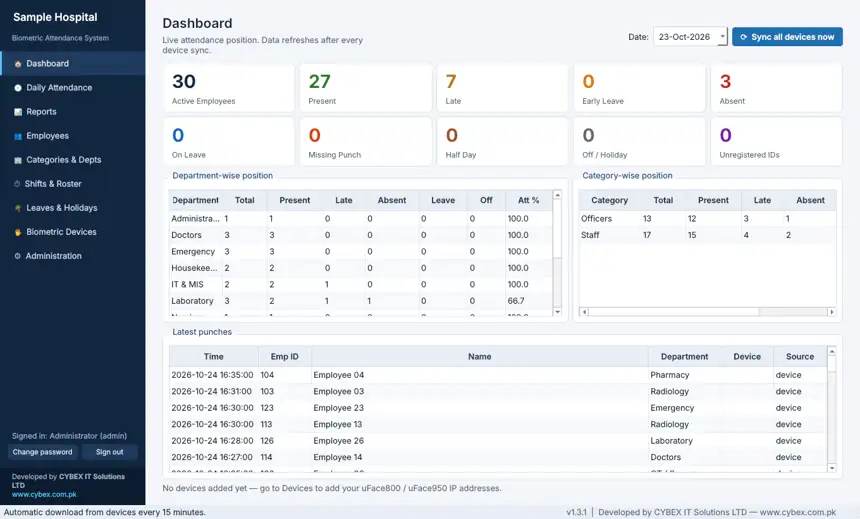
All features of the attendance software
Biometric device integration
- Works with ZKTeco uFace800, uFace950 and other machines that use the ZK protocol.
- Downloads punches from each machine’s IP address (TCP or UDP, port 4370), automatically every few minutes or on demand.
- Matches punches to employees by the Emp ID enrolled on the machine.
- Manage several devices, with a download log for troubleshooting.
Shifts, rosters and rules
- Define shifts, including overnight shifts.
- Grace periods for coming in and going out, half-day rules, overtime rules and weekly offs.
- Rotating rosters for employees or whole departments.
- Leave types, leave entries and gazetted holidays.
Daily attendance
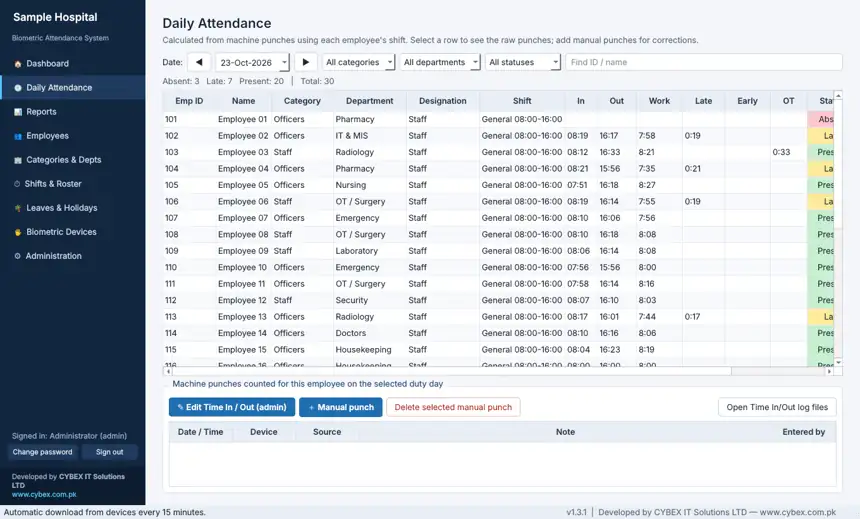
- Calculates in time, out time, working hours, late, early leave, overtime and status from raw punches.
- Dashboard with present, late, absent, leave, half-day and missing-punch counts by department and category.
- Manual punches and admin Time In / Time Out edits for corrections, with an audit log.
Employees and structure
- Employee records with category, department, designation and shift.
- Categories such as Officers and Staff, and departments such as Doctors, Nursing, Administration, Pharmacy and Laboratory.
- Import employees from Excel or CSV, with a template, and export them.
Reports
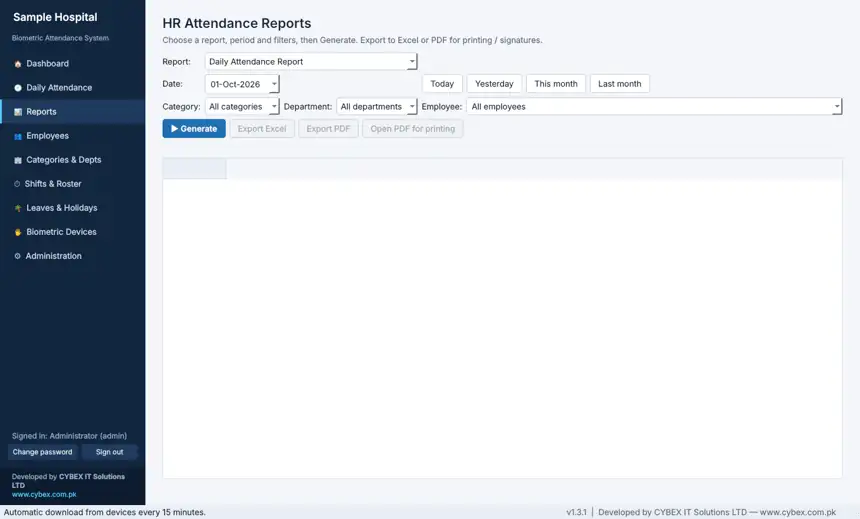
- HR attendance reports in Excel and PDF.
- A monthly Time In / Time Out log file.
Security, backup and install
- User login with admin, operator and viewer roles.
- Audit log of changes.
- Automatic daily backup and restore (single-file SQLite database).
- A single Setup.exe installer with everything bundled, so the PC does not need Python installed.
Who it is for
Hospitals, clinics, laboratories, factories, schools, offices and any organisation that runs morning, evening and night shifts and uses a biometric attendance machine. Ask us whether your device model is supported before you buy.
20 frequently asked questions
1. What is biometric attendance software?
Software that collects fingerprint or face punches from an attendance machine and calculates each employee’s attendance.
2. Which biometric machines does it support?
ZKTeco uFace800 and uFace950, and other machines that use the ZK protocol. Confirm your model with us first.
3. Is it available in Pakistan?
Yes. It was built by CYBEX IT Solutions in Faisalabad for hospital use in Pakistan.
4. Can I use it in other countries?
Yes. It is a Windows application that talks to devices on your own network, so it works wherever the device and PC are.
5. How does it get punches from the machine?
It connects over the network to the device IP address and downloads the punch log, automatically or on demand.
6. Does it need internet?
No internet is needed for attendance. The PC and the devices must be on the same network.
7. Does it support night shifts?
Yes. Shifts can be overnight.
8. Can it handle rotating duty rosters?
Yes. Rosters can be assigned to an employee or to a whole department for a date range.
9. How are late arrival and early leave calculated?
From the employee’s shift, using the grace periods you set for coming in and going out.
10. Does it calculate overtime?
Yes, using your overtime rule for each shift.
11. Can I add leaves and holidays?
Yes. You can define leave types, enter leaves and add gazetted holidays.
12. What if someone forgot to punch?
Authorised users can add a manual punch or edit Time In and Time Out, and every change is logged.
13. Which reports are available?
HR attendance reports with Excel and PDF export, plus a monthly Time In / Time Out log.
14. Can I import my employee list?
Yes. Import from Excel or CSV using the template.
15. Can I group staff by department and category?
Yes. Employees belong to a category and a department, and the dashboard shows both.
16. Who can use the software?
Users with admin, operator or viewer roles.
17. How is data backed up?
The app makes automatic daily backups and supports backup and restore from the Administration page.
18. How do I install it?
Run the Setup.exe installer on a Windows 10 or 11 PC. Python is not required.
19. Is it only for hospitals?
No. Any workplace with shift staff and a compatible biometric machine can use it.
20. How can I get a demo or pricing?
Message CYBEX on WhatsApp at +92 302 7833985.
Browse the other CYBEX software products.